LIVE NOTIFICATIONS

Real-Time Notifications Made Simple

KEY BENEFITS

Why Teams Rely on Arthix Notifications

Arthix Notifications help teams stay informed with real-time alerts that matter most. By delivering timely updates, teams can respond quickly and avoid missing critical events or opportunities.

With customizable rules and smart filtering, notifications are tailored to each team member’s role and priorities. This ensures that everyone receives only the most relevant information without unnecessary noise.

Multi-channel delivery and priority levels make communication seamless and effective. Teams can stay aligned, act faster, and maintain high performance with clear and actionable alerts.

Instant Alerts

Get notified the moment important events happen. Whether it is a new lead, a failed message, or a completed campaign, you will know in real time.

Custom Rules

Configure exactly which events trigger notifications. Set conditions, filters, and thresholds so you only see alerts that are relevant to your role.

Multi-Channel Delivery

Receive notifications through browser push, email, and in-app alerts. Choose the right channel for each notification type to stay informed your way.

Priority Levels

Classify notifications as urgent, high, normal, or low priority. Urgent alerts cut through the noise with prominent visual indicators and sound.

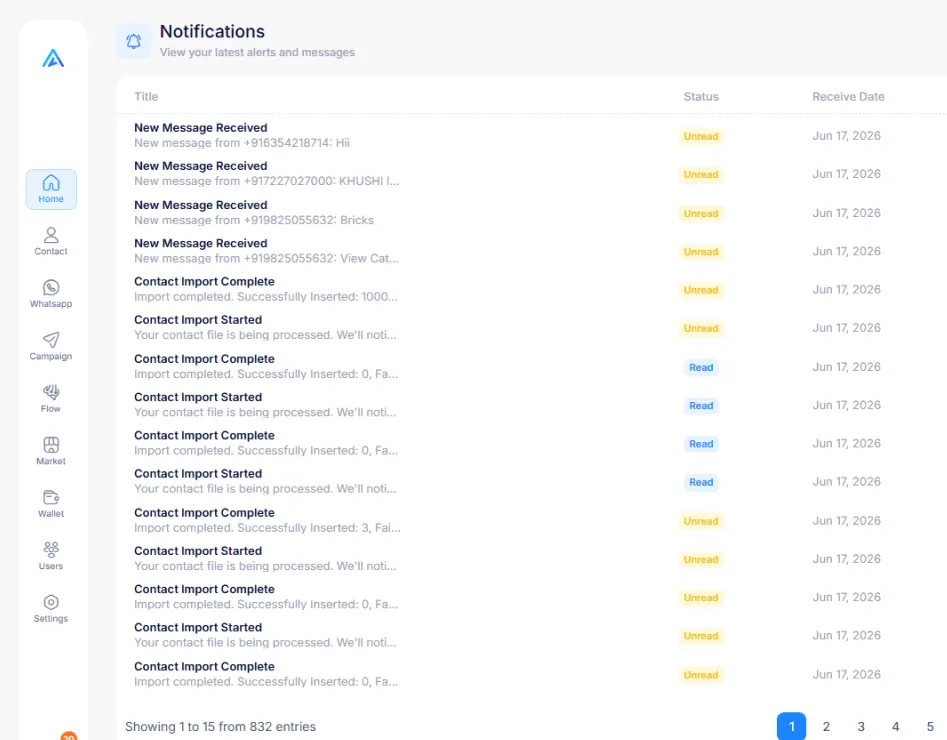
Live Notifications Dashboard
FOR NOTIFICATIONS

Simplifying Real-Time Notifications for Modern Teams

Real-time notifications made simple is all about delivering the right information at the right moment without complexity. It helps teams stay updated instantly, ensuring faster responses and better decision-making.

By simplifying how alerts are created and delivered, businesses can reduce noise and focus only on what truly matters. This leads to improved efficiency and a more organized workflow across teams.

With seamless integration and smart delivery, notifications become a powerful tool for productivity. Teams can stay aligned, act proactively, and maintain smooth operations every day.
NOTIFICATION TYPES

Alerts for Every Important Event

Arthix monitors your workspace and delivers targeted alerts for the events that matter most to your team.

New Message Received
Get alerted instantly when a customer sends a new WhatsApp message. Never leave a conversation waiting and maintain fast response times.
Template Approval Status
Know the moment your WhatsApp templates are approved, rejected, or flagged. React quickly to keep campaigns on schedule without delays.
Campaign Completion
Receive a summary alert when a broadcast or campaign finishes sending. See delivery, read rates, and failures at a glance.
System Alerts
Stay on top of system health with alerts for API errors, connectivity issues, rate limit warnings, and scheduled maintenance windows.
Team Mentions
Get notified when a teammate mentions you in a conversation or comment. Jump straight into the context without searching the thread.
Quota Warnings
Receive proactive alerts when your message quota, API calls, or storage usage approaches its limit so you can take action before service is interrupted.
CONFIGURATION

Set Up Notifications Your Way

Fine-tune your notification preferences in minutes. Every team member can customize their own alert settings.

Created with Snap
01

Choose Your Events

Select which events you want to be notified about. Toggle categories on or off, or drill down to individual event types for granular control over your alert feed.

02

Set Delivery Channels

Pick how you want to receive each notification. Route urgent alerts to email and browser push while keeping informational updates in-app only.

03

Define Rules & Filters

Create conditional rules to refine when notifications fire. Set quiet hours, filter by contact tags, or escalate alerts that remain unacknowledged after a set time.

DEEP DIVE

Advanced Notification Features

Fine-grained controls that let every team member stay informed without the noise.

Quiet Hours

Set do-not-disturb schedules so non-urgent alerts pause automatically.

Escalation Rules

Automatically escalate unacknowledged alerts to managers after set time.

Smart Grouping

Bundle related notifications into summaries to reduce clutter and fatigue.

Custom Sounds

Assign unique sounds to identify alert priority by ear.

GET STARTED FREE

Ready to Explore All Features?

Start your free trial today and experience every module hands-on. No credit card required, no setup fees, no strings attached.

Official WhatsApp Partner
Enterprise-grade Security
Priority Support
No Credit Card Required