VISUAL WORKFLOWS

Create Automations Without Coding

KEY BENEFITS

Automation Made Simple

Automation Made Simple helps you streamline repetitive tasks without any technical complexity. With an intuitive interface and easy-to-use tools, you can design workflows that save time, reduce manual effort, and improve overall efficiency across your team.

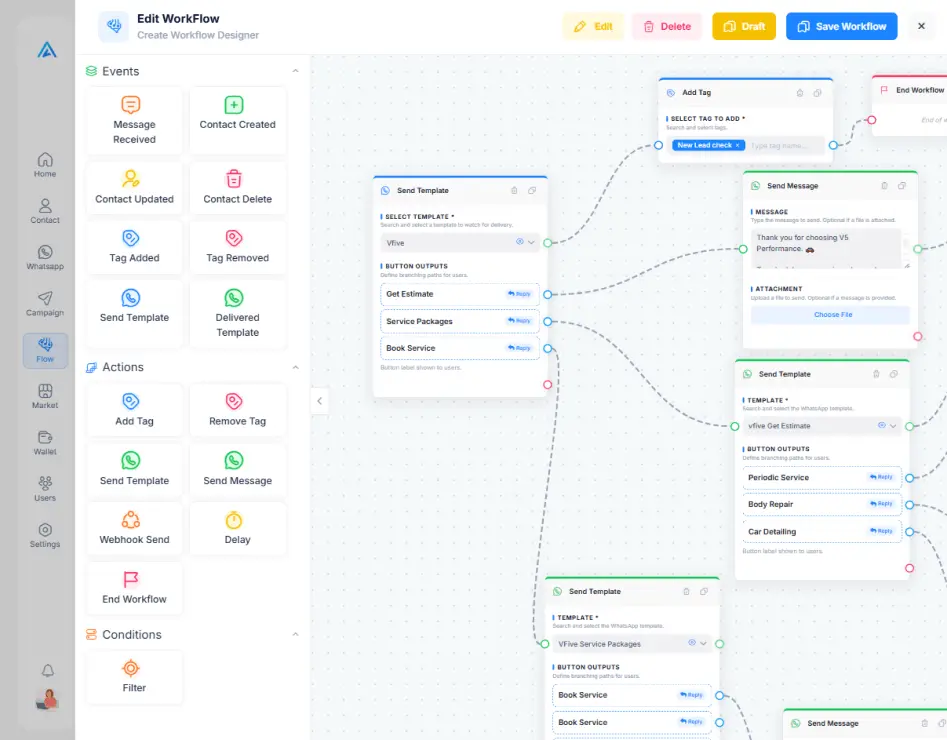
Create powerful automation sequences using drag-and-drop functionality, allowing anyone—technical or not—to build and manage processes effortlessly. From message triggers to conditional actions, everything works together seamlessly to keep your operations running smoothly.

Focus on what truly matters while automation handles the rest. Improve response times, maintain consistency, and scale your communication without increasing workload, ensuring a better experience for both your team and your customers.

Drag & Drop Builder

Place trigger nodes, action blocks, and condition gates on an infinite canvas. Connect them visually with simple drag-and-drop wiring that mirrors how you think.

Conditional Logic

Branch your workflow based on contact attributes, message content, time of day, or any custom field. Create personalized journeys for every scenario.

Time-Based Triggers

Schedule actions to fire at specific times, after delays, or on recurring intervals. Perfect for drip campaigns, follow-ups, and reminder sequences.

Multi-Channel Actions

Gather customer feedback after purchases or interactions. Ask for ratings, collect detailed responses, and route dissatisfied customers to support agents.

PRE-BUILT TEMPLATES

Start with Proven Workflow Templates

Skip the blank canvas. Choose from battle-tested automation templates and customize them to your needs.

Created with Snap
01

Welcome Series

Greet new contacts with a multi-day onboarding sequence. Introduce your brand, share valuable resources, and guide them toward their first purchase or action.

02

Abandoned Cart Recovery

Automatically remind customers about items left in their cart. Send timed nudges with product details, images, and direct links to complete the purchase.

03

Appointment Reminders

Reduce no-shows with automated reminders sent at configurable intervals before appointments. Include confirmation buttons and rescheduling options.

DETAILED FEATURES

The Building Blocks of Your Automation

Every node type and capability you need to build world-class automations.

Trigger Types
Start flows on contact creation, keyword matches, tag changes, form submissions, webhook events, or scheduled timers. Over a dozen trigger types available.
Action Nodes
Send messages, apply tags, update contact fields, assign agents, trigger webhooks, add delays, or execute API calls. Chain unlimited actions together.
Condition Branches
Split your flow into multiple paths based on if/else logic. Evaluate contact attributes, message content, time windows, and custom expressions.
Delay Timers
Insert precise wait periods between actions. Delay by minutes, hours, or days, or wait until a specific time of day to maximize message open rates.
Variable Mapping
Pass dynamic data between nodes using variables. Map contact fields, message responses, and API results to personalize every step of the journey.
Error Handling
Built-in fallback paths for failed API calls, undelivered messages, and unexpected conditions. Your automations recover gracefully instead of crashing silently.
USE CASES

Automate What Matters Most

Automate what matters most means using smart tools to simplify your important tasks efficiently and consistently. It saves time, reduces errors, and helps you become more productive every day.

  • E-Commerce Automation

    Automate order confirmations, shipping updates, abandoned cart reminders, and review requests in one seamless flow.

  • Lead Nurturing

    Score incoming leads, qualify them with automated questions, and send high-quality prospects directly to your sales team.

  • Customer Onboarding

    Guide new customers through setup, feature introductions, and best practices. Personalize onboarding based on industry, plan, or responses for a better experience.

DEEP DIVE

Advanced Workflow Capabilities

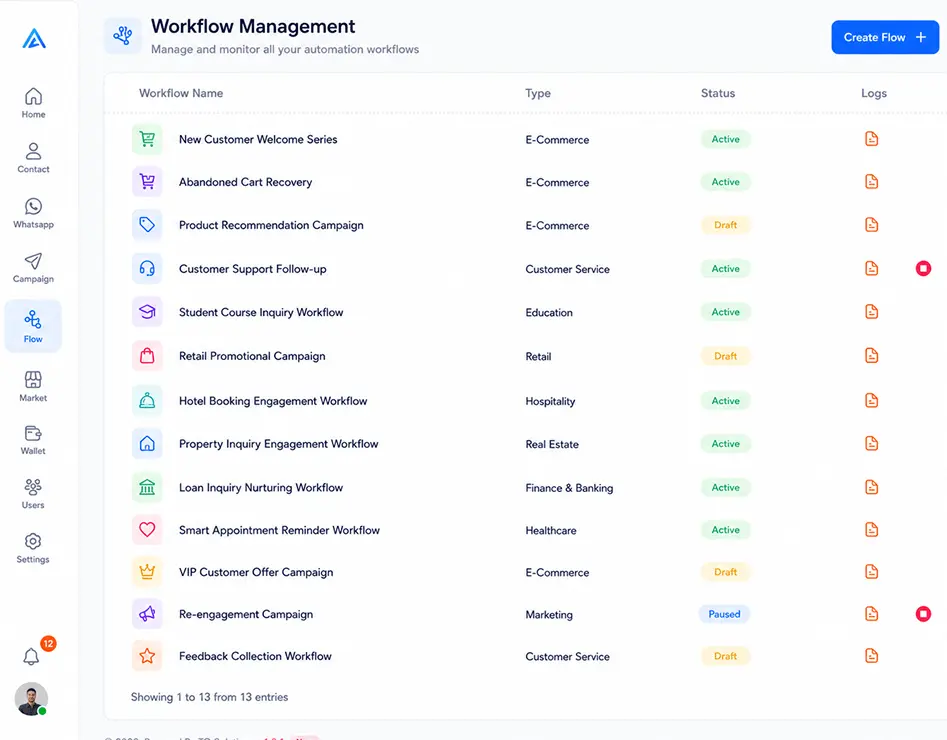
Advanced workflow capabilities help you automate complex processes with precision and efficiency. They enable smarter decision-making, seamless integrations, and highly customized user experiences.

Live Execution Monitor

Watch contacts flow through your workflow in real time.

Webhook Integration

Connect to external services via webhooks and push data to CRMs.

Workflow Cloning

Duplicate any workflow with a single click and customize it easily.

Flow Analytics

Track completion rates, drop-offs, and key metrics for every workflow.

GET STARTED FREE

Ready to Explore All Features?

Start your free trial today and experience every module hands-on. No credit card required, no setup fees, no strings attached.

Official WhatsApp Partner
Enterprise-grade Security
Priority Support
No Credit Card Required